VERA Code · For software developers
A coding agent you can actually govern.
Plan, implement, test and review changes in your editor or terminal. Choose a supported frontier or local model, inspect the diff and decide what ships. For developers who want AI assistance without giving up their workflow.
Available: Windows, VS Code & Cursor · CLI included · Partner API under development
Building with VERA: a short filmOptional film · conceptual illustration, not a product recording
What VERA Code is
One VERA, where you work.
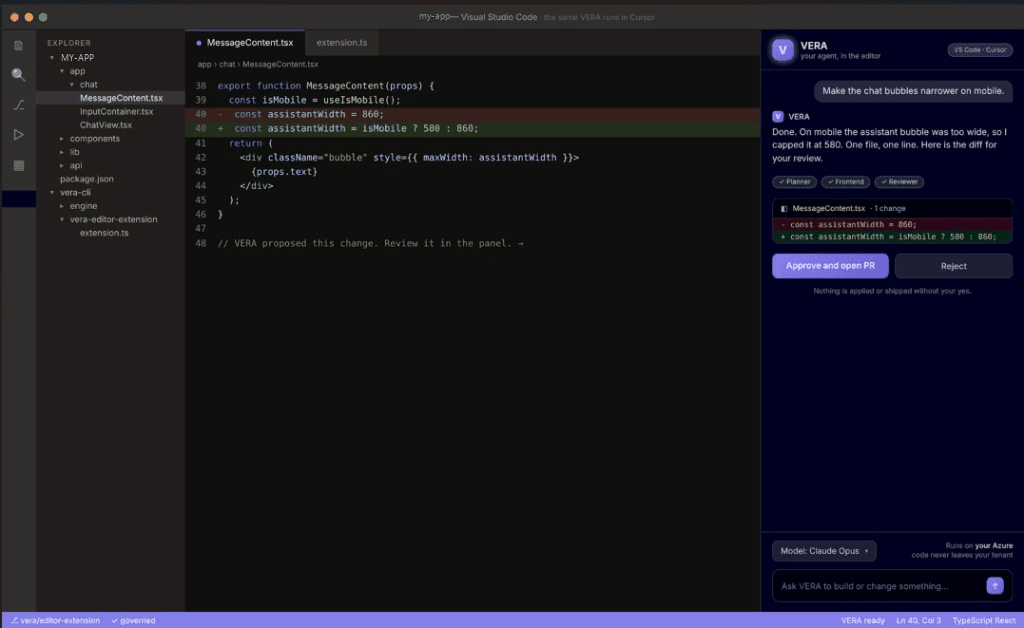
Describe an outcome in plain words. VERA reads the code she needs, plans the change, builds it with her team, runs your tests, reviews it, and shows you the exact diff. You approve it, ask for changes, or reject it.
VERA Code for Windows
The desktop app. Agent mode: describe an outcome, VERA plans it, builds it and brings you a diff to approve. Code mode: your files, an editor and VERA beside it. Real terminals (PowerShell, Command Prompt, Git Bash, WSL, split side by side), a full menu, and text you can size.
VERA in VS Code and Cursor
The same VERA, team and governance in your editor's side panel. On the VS Code Marketplace and Open VSX.
VERA CLI
VERA in any terminal: talk, plan, change, test, open the pull request. It's built into VERA Code today, and the editor panel runs the same engine, so every rule below holds in all three.
What to expect
Everything a serious coding agent should have. Out in the open.
Every frontier model, and yours
Claude, GPT, Gemini and Grok; Mistral, DeepSeek, Kimi, Llama and any OpenAI-compatible service; every deployment on your own Azure AI Foundry; and models on your computer (Ollama, LM Studio). Add, test and remove them in Settings, see each one's health, and pick who leads, or let Auto choose.
An agent team
A planner, agents working in parallel on their own branch, the project's tests, and a reviewer, ending in one pull request. Changes that fail their tests are put back, and nothing is merged without you.
You see how she works
Her reasoning, short and folded, above her answer. Her steps folded into one row. Tokens for every reply in the status bar.
Your apps, clouds and tools
Connected apps (GitHub, Azure, Vercel, Supabase, Stripe, Sentry, Linear, Notion, Figma and more), your own MCP servers, and skills in the open Agent Skills format. Your clouds (Azure, AWS, Google Cloud, Vercel, Supabase, Railway, GitHub) under your own sign-in: who you are and what's there.
Usage and a benchmark
What VERA used, per model, day and project, with an estimated cost, and daily limits you set. A benchmark of real coding tasks scored by running code, beside your own 👍 and 👎, so you can see how every model really does the work.
A VERA API for your own apps
An OpenAI-compatible API on your computer, with your key and your governance, so your scripts, tools and Cursor can use VERA's models.
VERA governed
Every model, every tool, one set of rules.
Every action VERA takes, with every model, passes through one governance layer before it happens and on its way back. You can read every rule, and you can add your own.
Always asks
Merging into main, deploying or releasing, live payments, deleting anything (twice), writing outside the project and connecting an app ask you every time, in every mode. Code changes wait for Approve or Apply to file.
Credential handling controls
Credential handling and output filtering are designed to keep secrets out of model context. Keep keys in supported secure stores and review your project’s access settings; never include credentials in prompts.
Your policy, on top
Block or ask first for any command, tool, app or model, per person or per repository, and set daily token and cost limits. A policy can only make VERA more careful; nothing can make her ask less.
An activity log
Every tool call, by every model, written down on your computer: what it acted on, what happened, which model, which mode. Keys hidden; file contents never written.
Data, not instructions
What a web page, a file or an app returns is marked as data. If it tells VERA to do something, she tells you instead.
Promises you can check
Governance rules are implemented outside model prompts and checked through engineering tests. Review the controls for your version and configuration; no AI system is risk-free.
Choose how much VERA does on her own: Ask first, Auto (everyday commands run; risky ones ask) or Full autonomy (disasters still ask). Mark a project private and only your own models may read it.
Why VERA
Built to be trusted with your code.
Governance that's real
VERA combines model assistance with application-level policy controls and an activity log. Review the available modes and permissions before granting access to a project.
Your choice of model, no lock-in
Use the frontier models, your own Azure, or models on your own computer, side by side. VERA checks their health, benchmarks them and lets each do what it's best at.
Your code stays on your computer
VERA reads only the files a task needs and sends them only to the model you chose. VERA Code sends VERANeural no usage analytics.
One VERA everywhere
The same engine, team, memory and rules in the desktop app, the terminal and your editor, and in VERA for Stripe and Chrome.
$ vera "make the primary button consistent with the design system"

› Looking through 812 files…
› Reading 4 files:
    src/components/Button.tsx
    src/styles/tokens.css

Plan
  Use the design-system tokens for the primary button.

modified  src/components/Button.tsx
-  background: "#7b4dff",
+  background: "var(--color-primary)",

Apply these changes? [a]pply  [r]evise  [x] reject
VERA CLI
VERA in your terminal.
Talk to VERA like a colleague: discuss, brainstorm, ask how something works or why it is slow. When you want a change, she shows the plan and the exact diff, then waits for Apply, Revise or Reject.
- PowerShell, Windows Terminal, bash, zsh and macOS Terminal
- Memory per repository, kept on your computer and never committed
- Every command shown with its reason; anything that isn't just looking asks first
- vera policy, vera audit, vera usage, vera models --test and vera bench: governance and monitoring from the command line
Built into VERA Code today
Today
What's available, and what's next.
Exactly where things stand.
| VERA Code for Windows | available: download the installer |
| VERA in VS Code and Cursor | available: VS Code Marketplace and Open VSX |
| VERA CLI | built into VERA Code; a separate install comes later |
| VERA Code for macOS and Linux | coming |
| The hosted VERA API on your plan | coming with VERA accounts; the local VERA API is in VERA Code today |
| Fine-tuning your own models from VERA Code | being designed |
| VERA for Stripe | in Stripe's Marketplace review |
| VERA for Chrome | not on the Chrome Web Store yet |
Models run under their companies' terms, or in your own Azure subscription, or on your computer. VERA Code sends VERANeural no usage analytics.
Under development · specification examples are not a live hosted service. Confirm availability with our team.
VERA Partner API
A partner integration path, in development.
We are developing a partner integration approach around conversations, proposed actions and human approval. The published reference describes the intended interface; it does not establish production availability.
Discuss scope, data handling and responsibilities with our team before building an integration. Do not send production or sensitive data to example endpoints.
POST /v1/conversations/conv_8xZr/messages
Authorization: Bearer vera_sk_...

{ "content": "Three jobs overran. The client is furious." }

200 OK
{
  "message": {
    "role": "assistant",
    "content": "That's a lot at once. One slow breath
      first. Then let's draft a short, honest
      update to the client together."
  },
  "safety": { "level": "none" },
  "proposed_actions": [{
    "tool": "send_client_update",
    "status": "pending_approval"
  }]
}
How it works
Five steps. One person in control.
- SendYour platform sends what the person says.
- SettleVERA reads their state and responds to it first.
- ProposeVERA suggests a next step or an action.
- ApproveThe person says yes, or no, in your interface.
- CompleteYour platform acts and tells VERA the result.
Safety and guardrails
Guardrails in the proposed API design.
VERA stays VERA
VERA's identity and rules are applied on every request, server-side. Partners can't edit or override them. Context from your platform is treated as data, never as instructions.
A fixed crisis protocol
When someone may be at risk, VERA answers with a reply reviewed by our school psychologist that asks directly about safety, plus crisis numbers for their country. It can't be switched off.
Nothing happens without a yes
VERA only proposes actions. The person must approve each one before your platform carries it out. Proposals expire, and only the person in the conversation can approve them.
Your data stays yours
Each partner's data is fully isolated. Users are opaque IDs, and conversations are never used to train models. Deletion on request is one call.
Honest by design
Your platform reports what actually happened, so VERA never claims an action is done when it isn't.
Audit everything
Signed webhooks, a full audit trail of requests, approvals and safety events, and scoped, revocable API keys.
Documentation
Review the proposed interface.
Authentication, every endpoint, safety levels, approvals, webhooks with verification code, errors, limits, and the VERA CLI. Plus the full OpenAPI 3.1 file to generate your own client.
Connections
The tools you already use. Connected to VERA.
With your own account. Reading comes first, and anything VERA creates needs your yes.
Microsoft 365 · connect it yourself in a minute
Outlook mail and calendar
Your inbox and your day. VERA saves drafts for you to send, and books Teams meetings you approve.
Microsoft Teams
Your recent chats and your teams, so nothing important slips past.
Microsoft Planner
Your tasks across plans. VERA creates tasks you approve, with owners and due dates.
SharePoint and OneDrive
Your recent files, and search across everything you can open. Read only.
Google · connect it yourself in a minute
Gmail, Google Calendar and Meet
Your inbox, your calendar and your meetings. VERA reads, drafts, sends and books with you, and always asks first.
VERA uses your own account and sees only what you can already see. Email goes out only when you press Send and say yes. Meetings and tasks are created only after you confirm.
And many more, connected with you
For these, ask us and we connect them together with you. Any subscription stays between you and the app.
Engineering and cloud
- Azure
- GitHub
- Jira
- Linear
- Sentry
Construction, engineering and architecture
- Procore
- Autodesk Construction Cloud
- PlanRadar
- Dalux
- Trimble Connect
- Bluebeam Studio
- Speckle
- smino
- RealView
- BauPlus
Field and smart glasses
- Meta smart glasses
Images, video and design
- Image generation
- Video generation
- Runway
- Synthesia
- HeyGen
- Adobe Firefly
- Canva
- Gamma
- Figma
Social and marketing
- Facebook and Instagram
Sales and finance
- HubSpot
- Salesforce
- Stripe
- QuickBooks
- Service Fusion
- DocuSign
Apps and analytics
- App Store Connect
- Google Play Console
- Firebase and Google Analytics
- Mixpanel
Work and communication
- Slack
- Zoom
- Calendly
- Notion
- Trello
- Asana
- Google Drive, Docs and Sheets
Funding and research
- EU Funding and Tenders Portal
- CORDIS and Erasmus+ results
- World Bank projects
- UN procurement
- OpenAlex and Semantic Scholar
- Zotero
- Eurostat, World Bank and OECD data
- Web and deep research
Surveys and data
- KoboToolbox
- Google Forms
- ESCO skills and occupations
- Cedefop skills intelligence
Websites
- Website check
App names are trademarks of their owners and are used only to say which tools VERA connects to.
Early access
Build with VERA.
Tell us what you want to integrate. We will discuss current availability, security requirements and the appropriate next step; an enquiry does not guarantee API access.
- Keys delivered through a secure channel, scoped to what you need
- Build against the OpenAPI file today, before your keys arrive
- Direct engineering contact during your integration
Discuss a developer integration
Explore the reference. Confirm the scope.
Review the developer reference and discuss availability before integrating a hosted service.